
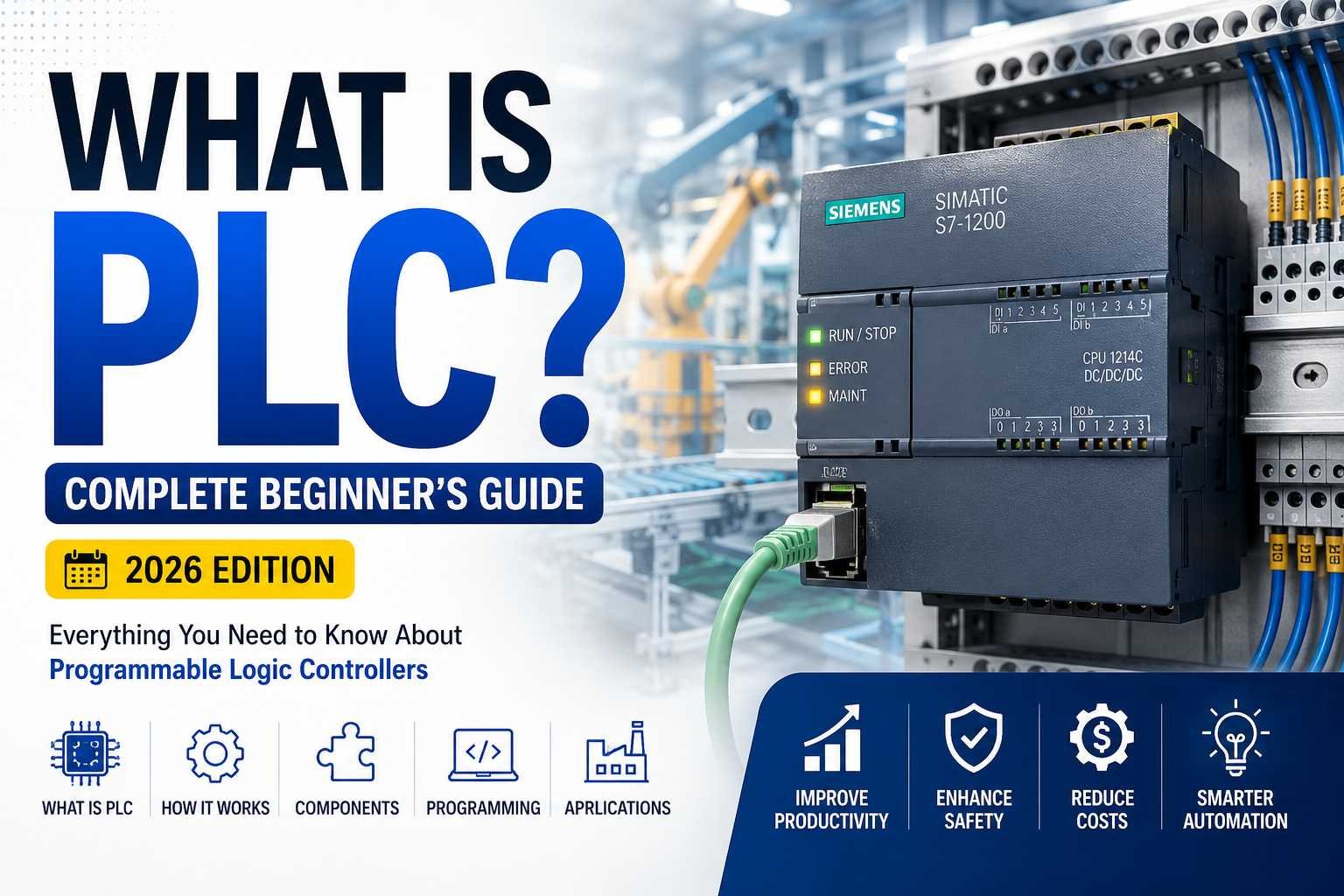
What Is PLC?
If you’ve ever wondered how factories automatically fill bottles, package food, control conveyor belts, or manage massive industrial plants without constant human intervention, the answer often comes down to one powerful device: the Programmable Logic Controller (PLC).
In today’s era of smart manufacturing and Industry 4.0, PLCs have become the backbone of industrial automation. From small manufacturing units to large oil refineries, almost every automated process relies on PLC technology to ensure speed, reliability, precision, and safety.
Whether you’re an engineering student, an electrician, a technician, or someone planning a career in industrial automation, understanding PLCs is one of the most valuable skills you can develop.
This complete beginner’s guide explains everything you need to know about PLCs in simple language. By the end of this article, you’ll understand what a PLC is, how it works, where it’s used, how to learn PLC programming, and why PLC skills remain in high demand in 2026.
What Does PLC Stand For?
PLC stands for Programmable Logic Controller.
A PLC is a rugged industrial computer specifically designed to automate machines and industrial processes. Unlike a regular computer, a PLC is built to operate continuously in harsh industrial environments where dust, vibration, heat, moisture, and electrical noise are common.
Instead of manually switching motors, valves, pumps, or conveyors on and off, a PLC automatically performs these operations based on the logic programmed into it.
Think of a PLC as the “brain” of an automated machine.
It continuously receives information from sensors, processes that information according to the programmed logic, and then sends commands to control devices like motors, relays, solenoid valves, alarms, and actuators.
Why Are PLCs So Important?
Before PLCs were invented, industries relied on thousands of relays and timers connected through complicated wiring.
Whenever production requirements changed, technicians had to rewire entire control panels.
This process was expensive, slow, and prone to errors.
PLCs revolutionized industrial automation because changing machine behavior became as simple as updating software instead of rewiring electrical panels.
Today, PLCs help industries:
- Increase production speed
- Reduce machine downtime
- Improve product quality
- Lower maintenance costs
- Enhance worker safety
- Save energy
- Improve process reliability
This flexibility has made PLCs an essential part of modern manufacturing.
History of PLC
The first PLC was introduced in 1968 by Dick Morley.
The automotive industry needed a better alternative to relay-based control systems because changing production lines required massive rewiring efforts.
The first commercially successful PLC was developed by Modicon.
Since then, PLC technology has evolved dramatically.
Modern PLCs now support:
- Ethernet communication
- Remote monitoring
- Cloud connectivity
- Industrial IoT
- Data logging
- Artificial Intelligence integration
- Predictive maintenance
This evolution continues to drive smarter factories around the world.
How Does a PLC Work?
A PLC operates using a continuous cycle known as the Scan Cycle.
The scan cycle consists of four main steps.
Step 1: Read Inputs
The PLC first checks all connected input devices.
Examples include:
- Push buttons
- Limit switches
- Temperature sensors
- Pressure transmitters
- Proximity sensors
- Float switches
- Emergency stop buttons
The PLC reads their current status.
Step 2: Execute Program
Next, the PLC executes the user program stored in its memory.
This program contains all the logic created by the programmer.
It determines how the machine should respond to different conditions.
Step 3: Update Outputs
After processing the logic, the PLC updates its outputs.
Outputs may include:
- Motors
- Contactors
- Valves
- Indicator lights
- Buzzers
- Hydraulic systems
- Pneumatic cylinders
Step 4: Repeat
The PLC repeats this entire process continuously.
Most PLCs complete one scan in only a few milliseconds.
This incredibly fast response allows industrial systems to operate safely and efficiently.
Main Components of a PLC
Understanding PLC hardware is important before learning programming.
CPU (Central Processing Unit)
The CPU is the brain of the PLC.
It processes input signals, executes logic, performs calculations, and controls outputs.
Power Supply
The power supply converts incoming electrical power into the voltage required by the PLC.
Input Modules
Input modules receive signals from sensors and field devices.
Examples include:
- Digital inputs
- Analog inputs
- Temperature inputs
- Pulse inputs
Output Modules
Output modules send signals to field devices.
Examples include:
- Relay outputs
- Transistor outputs
- Triac outputs
- Analog outputs
Memory
Memory stores:
- User programs
- Configuration
- Timers
- Counters
- Internal variables
Communication Ports
Communication ports allow PLCs to communicate with:
- HMIs
- SCADA systems
- VFDs
- Remote I/O
- Other PLCs
- Industrial networks
Types of PLC
Compact PLC
Compact PLCs integrate CPU, power supply, and I/O into one unit.
They are suitable for small automation projects.
Modular PLC
Modular PLCs allow expansion by adding extra modules.
These are commonly used in medium and large industries.
Rack PLC
Rack PLCs support hundreds or thousands of input and output points.
They are used in:
- Power plants
- Oil and gas
- Steel industries
- Water treatment plants
Safety PLC
Safety PLCs are designed for critical applications where human safety is essential.
Examples include emergency shutdown systems and machine safety circuits.
PLC Inputs Explained
Inputs provide information about the process.
Common digital inputs include:
- Push buttons
- Selector switches
- Emergency stops
- Limit switches
- Photoelectric sensors
Common analog inputs include:
- Temperature transmitters
- Pressure sensors
- Flow transmitters
- Level transmitters
- pH sensors
PLC Outputs Explained
Outputs perform the actual work.
Examples include:
- Motors
- Pumps
- Contactors
- Solenoid valves
- Alarm sirens
- Tower lights
- Conveyor belts
PLC Programming Languages
The IEC 61131-3 standard defines several programming languages.
Ladder Logic (LD)
The most popular PLC programming language.
It resembles electrical relay diagrams and is beginner-friendly.
Function Block Diagram (FBD)
Uses interconnected function blocks.
Ideal for analog control systems.
Structured Text (ST)
A high-level programming language similar to Pascal.
Useful for complex calculations.
Sequential Function Chart (SFC)
Used for sequential operations.
Common in batch processing.
Instruction List (IL)
Older programming language.
Rarely used in modern PLCs.
Popular PLC Manufacturers
Some of the world’s leading PLC manufacturers include:
- Siemens
- Allen-Bradley (Rockwell Automation)
- Mitsubishi Electric
- Omron
- Schneider Electric
- ABB
- Delta
- Keyence
- Beckhoff
- Phoenix Contact
Each platform has its own programming software and hardware architecture.
Where Are PLCs Used?
PLCs are found in nearly every modern industry.
Manufacturing
Automated assembly lines
Food and Beverage
Bottle filling
Packaging
Mixing
Labeling
Pharmaceutical
Batch processing
Clean room automation
Compliance systems
Oil and Gas
Pump control
Pipeline monitoring
Emergency shutdown systems
Water Treatment
Level control
Chemical dosing
Pump automation
Textile Industry
Machine synchronization
Production control
Cement Plants
Kiln control
Material handling
Crusher automation
Automotive
Robotics
Assembly lines
Paint shops
Real-Life PLC Example
Imagine a water tank.
A level sensor detects that the water level has dropped.
The PLC receives this signal.
It starts the pump.
When the tank becomes full, another sensor sends a signal.
The PLC immediately stops the pump.
No operator is required.
The process repeats automatically every day.
This simple automation saves labor, energy, and operating costs.
Advantages of PLC
PLC technology offers numerous benefits.
- Highly reliable
- Easy troubleshooting
- Flexible programming
- Long operational life
- Fast processing speed
- Easy maintenance
- Expandable hardware
- Excellent industrial durability
- Reduced wiring
- High accuracy
- Improved productivity
- Lower operating costs
Limitations of PLC
Although PLCs are powerful, they also have some limitations.
- Initial investment can be high.
- Training is required.
- Software licenses may be expensive.
- Different manufacturers use different programming environments.
- Complex applications require experienced programmers.
Despite these limitations, PLCs remain the preferred automation controller worldwide.
PLC vs Relay Control
| Feature | PLC | Relay Control |
|---|---|---|
| Flexibility | Excellent | Very Low |
| Wiring | Minimal | Extensive |
| Troubleshooting | Easy | Difficult |
| Maintenance | Low | High |
| Speed | Very Fast | Slow |
| Expansion | Simple | Difficult |
| Reliability | High | Moderate |
PLC and Industry 4.0
Industry 4.0 focuses on intelligent, connected factories.
Modern PLCs now integrate with:
- SCADA systems
- Industrial IoT platforms
- Cloud computing
- Edge devices
- Artificial Intelligence
- Machine learning
- Data analytics
- Predictive maintenance systems
This enables industries to monitor production in real time and make data-driven decisions.
Career Opportunities in PLC
Learning PLC programming opens doors to many careers.
Popular job roles include:
- PLC Programmer
- Automation Engineer
- Control System Engineer
- Electrical Engineer
- Instrumentation Engineer
- Maintenance Engineer
- SCADA Engineer
- Commissioning Engineer
- Industrial Automation Engineer
Industries worldwide continue to hire skilled PLC professionals due to increasing automation demands.

How to Learn PLC Programming
The best learning approach combines theory with practical experience.
Start by understanding electrical fundamentals.
Learn ladder logic.
Practice using simulation software.
Study industrial sensors and actuators.
Build small automation projects.
Work with real PLC hardware whenever possible.
Finally, practice troubleshooting because industries value engineers who can solve real production problems quickly.
Frequently Asked Questions
Is PLC difficult to learn?
No. Ladder Logic is designed to resemble electrical circuits, making it relatively easy for beginners.
Do I need coding experience?
No.
Most beginners learn PLC programming without any previous programming background.
Which PLC should beginners learn first?
Siemens and Allen-Bradley are excellent choices because they dominate industrial automation worldwide.
How long does it take to learn PLC?
Basic concepts can be learned within a few weeks.
Professional-level programming usually requires several months of consistent practice and hands-on projects.
Is PLC still in demand in 2026?
Yes.
The demand for automation engineers continues to grow as industries adopt smart manufacturing, robotics, Industrial IoT, and digital transformation technologies.
Final Thoughts
PLCs are the foundation of modern industrial automation. They control machines, improve efficiency, reduce downtime, and ensure safe, reliable operations across countless industries.
Whether you’re just beginning your engineering journey or looking to advance your career, learning PLC technology is a smart investment. As factories continue embracing automation, professionals with PLC expertise will remain highly sought after.
At IIEngineers, we believe practical knowledge is the key to success. Our mission is to equip students, technicians, and industry professionals with real-world automation skills through hands-on training and industry-focused solutions.
If you’re ready to build a career in industrial automation or need expert support for PLC, HMI, SCADA, DCS, VFD, ETAP, Energy Monitoring Systems, or Industrial Electrical Engineering, explore our training programs and engineering services at https://iiengineers.com or contact us at info.iiengineers@gmail.com.
By staying connected with IIEngineers, you’ll gain access to expert insights, practical learning resources, and the latest trends shaping the future of industrial automation.